Skip to content

Australian School & Government Purchase Orders Welcome

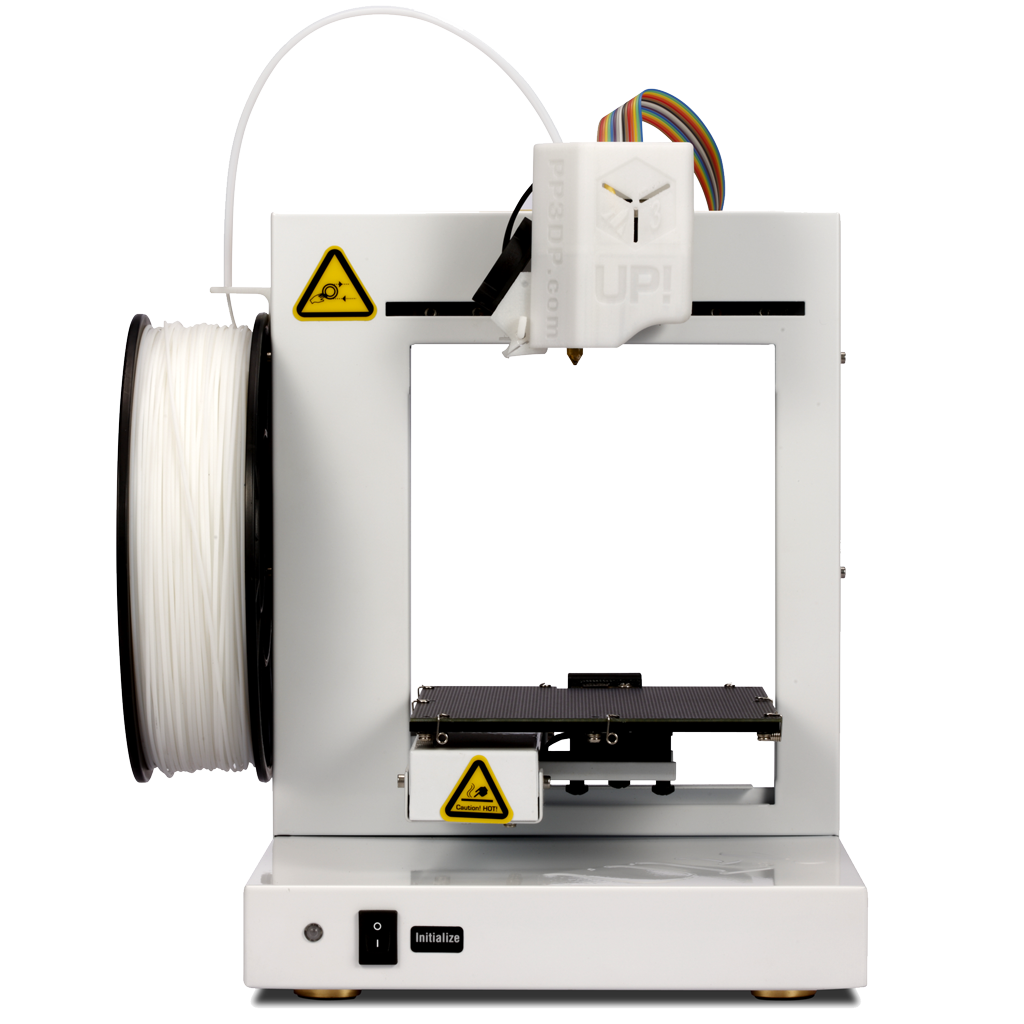
The UP! Plus 2 3D Printer is 3d printing made simple and affordable. It is the successor to the best selling and award winning UP! Plus. It includes all the great of award winning Up Plus with the addition of automated platform leveling and automatic platform calibration. Gone are the days of failed prints due to incorrectly calibrated or leveled build platforms. A sensor conducts a nine point measurement check of the platform surface before each print. The new V2 Up! software then calculates the optimal height and angle the nozzle should travel  to ensure parallel motion to the platform. It does the hard work for you. Optimum adhesion to the platform every time you print! A true out of the box 3d printing experience. Smart.

Performance has also been improved in slice processing speeds, so you can start printing even faster.

Up Plus 2 3D Printer for Professionals for sale Australian Sales

Using additive manufacturing technology to lay down successive layers of ABS to build up a printed three dimensional model. No more long waits to send your design concepts to a 3D print bureau and risk giving away your intellectual property. 3D Print whatever you want, whenever you want and as any times as you want.

The printer is assembled and ready to go out of the box and you’ll be printing models in 15 minutes. No need to spend weeks tinkering or fiddling to get average quality 3D prototypes with a cheap DIY 3D printing project, the UP! Plus 2 3D Printer is ready to go out of the box for either personal or professional 3D Printing.

This is the latest version which now includes the Version 2 Up! Software and 0.15mm (150 microns) build high resolution!

You can now print models completely hollow and raft less. 

Up PLus 2 in Sparkle Red

The Up Plus 2 is sleek design shown here in Sparkle Red. The open design makes it easy to view and remove models from the build platform.

Up Plus 2 3D Printer rear view

Rear view of the UP Plus 2 showing the full metal construction and detachable spool holder. The compact design makes it extremely portable and fits nicely on your desk.

Up Plus 2 linear bearings

A great feature of the Up Plus 2 3d printer is the uses high quality liner rails, ensuring high quality prints and quite operation.

Perforated build platform on the up plus 2

Another great feature of the Up 3D Printers is the use of perforated heated build platforms. The perforations secure printing material to the base. When the print is completed the board can be removed from the 3d printer and removed safely without applying and force on the 3D printer. This is ideal for classroom environments.

Up Plus 2 Auto Height Detection Mechanism

A close up view of the auto height detection mechanism, which makes calibration a one click operation.

Up Plus 2 Auto Leveling Mechanism

The Up Plus 2 features an Automatic bed leveling system. No Need to adjust the print bed. This cleaver system takes a 9 point measurement on the build plate, from which it establish the orientation of the build plate. The clever Up software then compensates for the orientation- ensuring that the first layer prints evenly.


 The Up software provides the ability to pause the print as nominated layers so you can change the filament to a new colour, then continue printing. This enables you to get creative and print multicolor parts and controlled intervals.

One of the great strengths of the Up 3D Printing software is the way it builds smart support structures that easily break away from the model, resulting in a greater ability to print complex models and provide cleaner undersides of your 3D printed parts.

The print quality of these machines is amazing. This is a large print in ABS.

The easy to remove smart support structures allow the finest details to be produced.

There are a heap more print samples in on the Gallery page- check them out here.

Specifications

  • Build platform: 140mm width, 140mm depth, 135mm height. That's nearly 3 litres of build volume.
  • Selectable Z resolution: 0.15mm, 0.2mm, 0.25mm, 0.3mm, 0.4mm
  • Support Material: Smart Supports. Intelligent snap off support material, printed in the same material, printed at a lower density and built automatically by the included 3D print software.
  • Dimension: 245mm width,260mm depth, 350mm height
  • Weight: 5kg
  • Shipping Weight: 10kg
  • Power input: 110-220VAC, 50-60Hz, 220W
  • Power output: 20 VDC 11amp
  • Connectivity: USB (Print job stored and spooled to Printer, ability to turn off computer during printing.)
  • Consumables: 1.75mm ABS Plastic Filament or PLA (corn starch)  Filament
  • Software: STL 3D layout and printing software included free for Windows and MAC 10.7 Beta
  • Operating System: Windows XP, Vista, Windows 7, Window 8, OSX 10.7 beta
  • Unboxing time to print: 15 minutes
  • Truly 'desktop' size and easily portable
  • Produces fine detail models
  • Does not need a PC to run once model has been loaded
  • 12 month warranty (please see notes below)
  • Active user community
  • Supplied with a kit of additional parts (see below)

 Consumables:

  • 1.75mm tough ABS filament plastic formulated with a very low odour. (1 roll included)
  • 1.75mm Polylactide (PLA) corn starch ideal for lost wax / investment casting. (not included)

In the box

  • Automatic platform leveling calibration
  • Automatic platform height calibration.
  • UP! Desktop 3D Printer Plus - latest version with v2 software
  • Heated build platform and perfboard. 
  • 1 x roll of 500g white ABS. (see our extensive colour range here)
  • Heat resistant gloves
  • Selection of tools to maintain and self service the printer.
  • Visual Click to Print 3D Printing Software and USB drivers.
  • STL files for printing its own spare parts.
  • Media spool holder

The Up Plus 2 has a complete tool kit with everything you need to start printing

Unboxing the Up Plus 2 3D Printer 

Up Plus 2 3d printer winner of the Make Magazine best print quality

The UP! 3D Printer Plus (known as the Afinia H-Series 3D Printer in the United States) won the 2012Make Magazine 3D Printer Buyer’s Guide competition. Out of 15 3D printers that were reviewed, it won Best Overall Experience, Easiest Setup, and tied in the Easiest To Use category. It also scored a 5/5 for print quality (and that was before they upgraded to a 0.15mm resolution!).

The multi award winning Up Plus 2 wins the class of "Just Press Print" in the Ultimate Guide to 3D Printing 2014.


Printing Printing Technology Melted Extrusion Manufacturing(MEM)
Build Volume 138 x 135 x 138 mm (W x H x D)
5.5”x 5.3”x 5.5”
Print Head Single, modularize for easy installation
Layer Thickness 0.15/0.20 /0.25 /0.30 /0.35 /0.40 mm
Supporting Structure Smart Support Techology:
automatically generated, easy to remove and fine-tunable.
Platform Leveling Automatic Leveling and automatic detection of nozzle height
Print Surface Heated with perf board
Average Operational Noise 55 dB (it's quite)
Untethered Printing Yes
Consumable Supported Printing Material UP ABS,UP PLA
Software Bundled Software UP Software
  Compatible Format STL,UP3,UPP
  Connectivity USB
  Operating System Win XP/Vista/7/8,Mac OS
Power Supply Power Adapter 110-240VAC,50-60 Hz,220W
Mechanical Chassis Metal body, open form
Weight 5KG / 11LB
Dimension 245(W) x 350(H) x 260(D)mm
Weight with Packaging 9.2KG / 21LB
Packaging Dimension

390(W) x 460(H) x 330(D) mm

Downloads

-Up Plus 2 User Manual.pdf-

-3D Printing Systems Warranty Terms on Up 3D Printers.pdf-

-3D Printing Systems Extended Warranty Terms on Up 3D Printers.pdf-

  • 5 stars: 13 (72%)
  • 4 stars: 3 (17%)
  • 3 stars: 0 (0%)
  • 2 stars: 0 (0%)
  • 1 star: 2 (11%)
C
Clint B.
Temp failure

Temp sensor keeps failing

T
Thomas R.
works well Had an issue

works well Had an issue with downloading software

s
sad
bad

bad

M
Matthew S.
Great service

3D printing systems were very diligent and punctual when providing information and answering questions.

H
Heather H.
I found the 3d Printer

I found the 3d Printer superstore staff so helpful when helping me with my purchase. I received my order promptly and was exactly what i needed . I look forward to working with them in future when I buy more printers.

G
George P.
Up Plus 2 3D Printer.

I have now had my printer for one week and I am very pleased with the results so far. I would like to have seen a "quick guide to setting up" sheet in the box before down loading the users manual. As a result I have made up a check list that shows the order of setting up. I did have a problem with the initial set up due to a problem with the driver but a call to the shop and a very helpful and patient person on the other end of the line soon had the problem rectified. The many visitors to the shed have also been impressed by the end results. A working knowledge of a CAD program is essential if original work is to be under taken.

L
Leighton L.
Perfect Entry Level 3D Printer

i would class myself as an average tinkerer, but an old school 3d acad modeller from waaay back. this little machine is easy to understand and easy to use. Printing experimentation, research and development is both fun and rewarding.

L
Leighton L.
UP! Plus 2 - Plug'n'Play!

Probably the best entry level plug'n'play 3D printer out. I have had no problems so far, being medium level tech savvy.

Z
Zac S.
Up 3D Purchase

really good knowledge from Mark and the team, printer arrived super quick and is working seamlessly.

Zac
Bendigo

H
Habib T.
What a great little printer

Great service and a good printer in the best price available in the market.
Very happy with my purchase.

J
Jonathan T.
Very cool 3d printer!

Super happy with my purchase. Prints better than I thought, the quality of models is excellent. Print area is a little on the small side, but this is not much of an issue.

K
Karlis A.
Up! Plus 2

Overall the printer that I purchased is pretty decent, but it does take some time trial and error for the printer to give a good result. The positioning of the stl file within the up software is quite important, and directly impacts upon the quality of the finished part. I have found that it's best start the print on a warm tray, with the vent closed. For intricate parts with fine details, it is better to print with the vent open, to allow faster cooling, as the nozzle can slightly burn, and warp the part. The Up software is pretty good until it comes to printing assemblies consisting of multiple parts, if the parts happen to overlap, the overlapping section can sometimes result as missing/hollow. If the parts are constrained together, and you wish them to be printed as one fused piece, it becomes dependent on how you draw it in your CAD software. Even though the build platform is 140mm wide, you can only print between the clamps, and that distance is more like 130mm. Overall I am pleased with the printer, and the customer service is very good.

L
Lawrence T.
Up Up and Away!

Very happy with the printer. The printer is so easy to set up and operate. A few glitches here and there but it sorted itself out. My first test run came out very well. The second not so good. On both occasions when there were issues it had more to do with the designs I created and selected for testing out. Looking forward to more happy printing. Support from 3d Printer Superstore was first-class: helpful and friendly. Four stars!

S
Son T.
UP! Plus 2 so far so good

I bought this product 3 weeks ago, and It has been working non stop since the day I bought. No big problems so far. It is really a good gear for personal use.

D
D. W.
UP! 2 Plus

Ordered and it got here in < 3 working days which was great as was overlapping New Year. Arrived well packed and was quite easy to setup.

The build seems very sturdy and has a very small desktop footprint. Initial test prints had a lot of detail and printed at fine and Z resolution of 0.15mm. Test prints included a few characters from thingiverse.com, gnome, pet monster, dalek and a few printer spare parts and upgrades.

Ones that started and went to completion were perfect, was amazed at the detail and ease of which support structures were removed.

My tips :-

a) Make sure the bed is fully heated to at least > 95C.
b) After setting the nozzle height automatically I use maintenance option in the program and add 0.30mm to the nozzle height it reported. For me, this resulted in the 1st layer of the raft being squished firmly into the holes in the board resulting in a very firm hold.
c) Watch your print for a few layers after the raft, if any failed they failed early because of poor bonding to the board.
d) If a large print, check at least every 30 minutes because if something bad happens the poor printer usually does not know and just keeps going on as if all is fine (usually resulting in a large wad of plastic in one place).

D
Damien
Great Printer

Purchased this little over a week ago, after an issue with getting the drivers installed this printer has been great, good print quality no issues with it as long as the removable bed is kept oil free from finger prints ect ect. very pleased with it

A
Andrew F.
Excellent Printer

Within half a week of getting this printer I had finished the included roll of ABS, and I had 1 failed print. This is a refreshing change!.
It has not been 2 weeks yet, and it has (according to the software) done 2.4kg of ABS, and I have only had 4 or 5 prints fail from warping, primarily due to that ABS needing to be 5 or 10C cooler than it was printing.
Thats where this printer is not perfect though, no temperature control is severely inhibiting, but a single 10 ohm resistor got the temperature withing a couple degrees of what I used to print my on my Felix (for my main ABS), and got more perfect prints coming out.
The raft is incredibly excessive for small objects, and it is near impossible to print raftless. I have had fine components have 2/3 their plastic in the raft! ... generally though, it is excellent.
The nozzle height detection if off, somewhere between 0.15 to 0.25mm, it can't be trusted. When you do many prints in a row, you need to remember to adjust the bed height approximately 0.05mm per print, the bed drifts on the z axis. For example, at the start of the day it will be 130.68, by the end of the day it will be 130.15. Might not sound much, but the first later is somewhere in the 0,05 to 0.1mm range, so you need it to be spot on.
In short..... buy this printer!!!

C
Chris H.
Purchase of UP 3D Printer

Printer has arrived and I have set it up. It is working perfectly. Very prompt response to my question about the order arriving in two deliveries. Excellent service overall.